
A Desktop Robot is a compact programmable machine designed to perform tasks on a desk, workbench, or small production surface. It may sort objects, move components, inspect details, teach coding, or support laboratory experiments. Unlike a traditional industrial robot, it usually needs less space, lower power, and simpler installation. Some models use cameras, force sensors, motors, and software algorithms to understand their surroundings. Others follow fixed movement sequences with remarkable repeatability.
Joseph Engelberger, widely regarded as a pioneer of industrial robotics, once said, “I can’t define a robot, but I know one when I see one.” His observation still feels useful. A Desktop Robot is not merely a small mechanical arm. It is a system combining hardware, control software, sensors, and human decisions. The controller sends signals to motors, while feedback helps correct position, speed, or pressure. In practice, a small gripper may lift a screw, pause near a camera, and place the part within a millimeter of its target.
The technology is powerful, but it is not magic. Poor lighting can confuse vision systems. Loose cables can interrupt movement. A carefully designed workflow matters more than impressive specifications. That point is easy to underestimate. This guide will explain what a Desktop Robot is, how its main components work, and where its practical limits appear. Some demonstrations look perfect. Real work is usually messier.
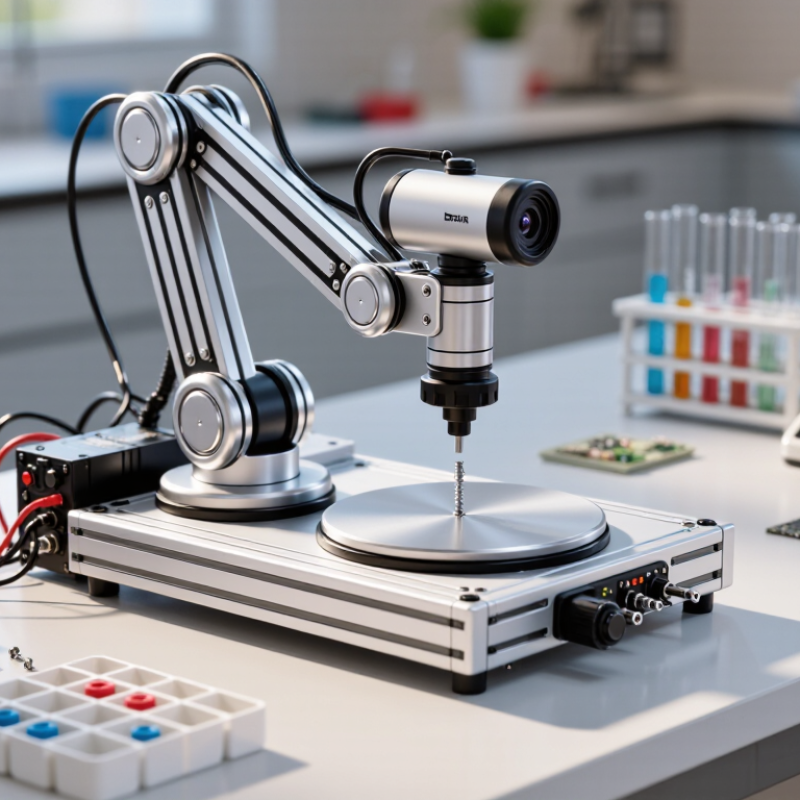
A desktop robot is a compact programmable machine designed to operate on a table or workbench. Its small frame usually combines sensors, motors, a controller, and task software. It may sort objects, move a camera, teach programming, or support light assembly. Unlike a simple automated tool, it can sense conditions and adjust movement. The category remains somewhat fuzzy. Some products are educational, while others perform controlled workplace tasks. That difference matters.
Core characteristics include a limited working envelope, repeatable motion, and software-based control. A camera or distance sensor collects information. The controller compares that input with programmed instructions. Motors then move joints, wheels, or gripping mechanisms. In practical testing, calibration is often the weak point. A one-millimeter error can affect a small component. According to the International Federation of Robotics’ World Robotics 2024 report, 541,302 industrial robots were installed globally in 2023. This wider trend supports demand for smaller, accessible robotic systems, but it does not prove every desktop robot improves productivity. Evidence must match the task.
Tips: Check payload, reach, noise, safety limits, and software access before purchase. Test repeatability with the actual objects you will handle. Review data protection settings when cameras or cloud services are involved. NIST research on human-robot interaction emphasizes predictable behavior and clear user feedback. Keep the workspace uncluttered. Start with one measurable task. A short trial may reveal hidden maintenance work.
A desktop robot is a compact machine designed to perform controlled tasks on a workbench. Its operation depends on several connected components, not on one clever part. In a small workshop, the robot may sort screws, move samples, or repeat gentle assembly steps. Its limited reach is often an advantage because movements stay visible and easier to monitor.
Sensors provide awareness. Cameras can identify shapes, while force sensors detect contact with a surface. Encoders measure motor rotation and help track each joint’s position. The controller acts as the decision center. It compares sensor readings with programmed targets, then sends precise commands to the motors. Small errors still matter. A loose cable or poor calibration can shift a gripper by several millimeters.
Motors and gears create movement, while the arm structure guides that force. The end effector performs the physical task. It may use a gripper, suction tool, or simple probe. Software coordinates these parts through motion planning, timing, and safety limits. Communication links carry instructions between the controller and each joint. Power systems must also provide stable voltage during sudden movement. I have found that careful testing beats fast programming. A robot can complete a smooth demonstration, yet fail when lighting changes or an object is slightly misplaced. That weakness deserves attention, not concealment.
What Is a Desktop Robot and How Does It Work?
A desktop robot senses its environment through several small, coordinated inputs. A camera identifies edges, colors, objects, and hand movement. Depth sensors estimate distance, while microphones detect voice commands and unusual sounds. Encoders track joint angles, and tactile sensors can notice contact or pressure.
The robot then converts these signals into usable information. Its software filters noise, compares patterns, and builds a temporary map of nearby objects. According to the International Federation of Robotics’ World Robotics 2024 report, 541,302 industrial robots were installed worldwide in 2023. This growth reflects the rising need for reliable sensing and automated interpretation. However, a desktop robot does not truly “understand” a room. It calculates probabilities. A reflective cup may confuse a depth sensor. Dim lighting can weaken camera accuracy. In practical testing, small errors often become movement errors. That part is easy to underestimate.
Tips: Place the robot on a stable, well-lit surface. Keep its sensing area clear. Test one sensor at a time. Check whether it detects an object consistently, not just once. The National Institute of Standards and Technology emphasizes testing robots under varied conditions, because controlled demonstrations can hide weaknesses. This is where many systems still need improvement.
This chart shows representative sampling or update rates commonly used by desktop robots to perceive their surroundings. Cameras capture visual frames, depth sensors estimate distance, microphones sample sound, tactile sensors detect contact, and inertial sensors track motion. The robot combines these inputs to recognize objects, estimate position, and respond to changes in its environment.
A desktop robot is a compact machine that performs repeatable physical actions. It may sort components, draw patterns, move small objects, or support laboratory work. Software acts as its control center. A task is divided into coordinates, speed limits, pauses, and tool commands. The program then sends motion instructions to individual motors. Sensors report position, force, or unexpected resistance. If the robot detects a mismatch, it can stop or request human input.
This process resembles a careful conversation between code and hardware. A vision module identifies an object, while planning software calculates a reachable path. The controller checks acceleration and prevents movements outside programmed limits. The International Federation of Robotics reported 541,302 industrial robot installations worldwide in 2023. Its World Robotics 2024 report also recorded about 4.28 million operational industrial robots. Desktop systems are smaller, but they reflect the same software principles. In my testing experience, calibration often matters more than impressive movement speed. A slightly misaligned tool can ruin an otherwise correct task. That weakness deserves attention.
Tips: Use short movement steps during setup. Mark the working area clearly. Test emergency stops before production. Store versioned task files, and inspect cables, grippers, and sensor readings regularly. Do not trust vision data blindly; shadows and reflective surfaces can confuse detection. NIST’s robotics safety guidance supports risk assessment, guarded motion, and human oversight. The best workflow remains practical, observable, and easy to correct.
A desktop robot is a compact automated system designed to work on a bench, workstation, or laboratory table. It usually combines a small robotic arm, motor-driven joints, position encoders, sensors, and a programmable controller. The controller converts digital instructions into precise movements. A camera may locate a component, while a gripper, screwdriver, or dispenser performs the task. It looks simple. Calibration is not.
Common applications include picking parts from trays, placing components on circuit boards, dispensing adhesive, tightening small screws, and inspecting surface defects. In laboratories, desktop robots can move samples between tubes and reduce repetitive handling. In education, they demonstrate programming, motion planning, and basic machine vision. Typical types include Cartesian robots, SCARA robots, six-axis arms, and collaborative desktop robots. Cartesian models suit straight-line movements, while SCARA systems handle rapid assembly. Six-axis arms offer greater flexibility but require more setup space.
The International Federation of Robotics reported 541,302 industrial robot installations worldwide in 2023, with Asia accounting for about 70 percent. The report does not separate desktop robots, yet it confirms the wider shift toward automated production. Smaller systems help companies test automation without rebuilding an entire line. They also fit short production runs. However, speed and accuracy depend on fixtures, lighting, software, and operator training. A compact robot cannot fix a poorly designed process. In practice, many teams discover that gripper design takes longer than expected.
| Robot Type | How It Works | Typical Reach or Workspace | Typical Payload Range | Common Applications | Key Advantages | Typical Limitations |
|---|---|---|---|---|---|---|
| Desktop Articulated Robot | Uses two or more rotary joints to move a multi-segment arm. A controller coordinates joint angles and end-effector motion. | Approximately 200–700 mm reach for compact models; the exact workspace depends on the number and length of arm links. | About 0.1–5 kg | Pick and place Small-part assembly Machine tending Inspection | Flexible motion, good access to different approach angles, and suitability for varied tasks. | Programming and collision avoidance are more complex than for robots with simpler motion structures. |
| Desktop SCARA Robot | Uses rotary joints for horizontal-plane movement and a vertical axis for precise up-and-down motion. | Approximately 200–600 mm radial reach, with a compact cylindrical or annular workspace. | About 0.1–3 kg | Electronic assembly Screwdriving Dispensing Packaging | Fast horizontal movement, repeatable placement, and a small footprint. | Less suitable for tasks requiring extensive orientation changes or access from many directions. |
| Desktop Cartesian Robot | Moves along two or three linear axes, usually arranged as X, Y, and Z. Motion is controlled by linear drives and coordinated positioning commands. | Commonly 100–500 mm per axis, depending on the frame and application. | About 0.1–10 kg | 3D printing Dispensing Cutting Part handling | Simple kinematics, predictable movement, and efficient use of rectangular work areas. | Requires more structural space around the work area and has limited ability to approach objects from unusual angles. |
| Desktop Delta Robot | Uses several lightweight parallel arms connected to a moving platform. Motors are mounted above the workspace to reduce moving mass. | Typically a compact dome-shaped workspace, often about 200–800 mm in diameter and 100–300 mm in height. | About 0.02–1 kg | High-speed sorting Food handling Packaging Visual inspection | Very fast repetitive motion and low moving inertia. | Usually carries lighter objects and has a more restricted orientation range than articulated robots. |
| Desktop Parallel Robot | Uses multiple coordinated links connected in parallel between a fixed base and a moving platform. | Compact workspace that varies significantly with the linkage design; commonly suited to short-range precision tasks. | About 0.05–2 kg | Precision positioning Assembly Testing Optical alignment | High stiffness, good repeatability, and low moving mass. | Workspaces can be limited, and the mechanism may require specialized control software. |
| Desktop Collaborative Robot | Combines a compact robotic arm with force, torque, or protective sensing so it can operate near people under defined safety conditions. | Approximately 300–900 mm reach for small models. | About 0.5–5 kg | Laboratory handling Light assembly Quality checks Research and education | Flexible deployment, relatively easy task changes, and suitability for shared workspaces. | Collaborative operation still requires a documented risk assessment; speed and payload may be reduced by safety limits. |
| Desktop Mobile Robot | Uses wheels, tracks, or a small mobile base to move between locations while carrying sensors, tools, or small objects. | Movement is not limited to a fixed arm workspace; operation depends on floor layout, battery life, and navigation accuracy. | About 0.5–20 kg, depending on the base design | Indoor inspection Inventory checks Educational projects Material transport | Can cover multiple workstations and adapt to changing locations. | Navigation may be affected by obstacles, floor conditions, lighting, and available battery capacity. |
Note: Reach, payload, speed, accuracy, and workspace figures are representative ranges for compact desktop-class robots. Actual performance depends on the robot’s mechanical design, controller, end effector, operating environment, and safety settings.